









Soldering Irons Buyer's Guide: How to Pick the Best Tool for Your Projects

Soldering Irons Buyer's Guide: How to Pick the Best Tool for Your Projects
Whether you're building a small hobby electronics project, repairing a vintage radio, or assembling a complex PCB, the right soldering iron makes a world of difference. A good soldering iron is not only about heat; it's about control, precision, safety, and comfort. In this guide, we'll break down the essential factors to consider when buying a soldering iron, explain how different models fit different jobs, and offer practical tips to help you choose the tool that will keep your projects moving smoothly. By the end, you'll know how to pick a soldering iron that matches your experience level, budget, and typical tasks.
Understanding the Basics: What a Soldering Iron Does
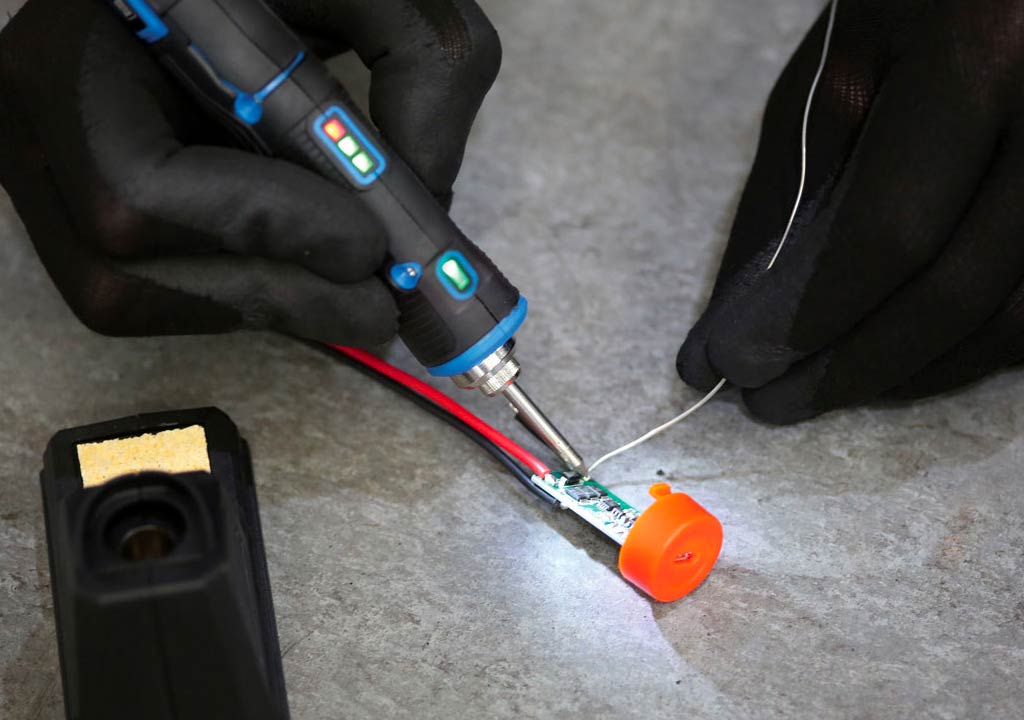
At its core, a soldering iron converts electrical energy into heat at the tip. The heat melts solder, allowing you to join metal surfaces such as electronic components to a circuit board or wires to connectors. A few key variables determine how well an iron performs:
- Temperature: The heat delivered to the tip and its stability.
- Tip design: The shape and size of the tip affect how you apply solder and how much precision you have.
- Power: The wattage or heat capacity, influencing how quickly the tip heats up and how well it maintains temperature under load.
- Control system: Analog, digital, or smart control, which affects how consistently the temperature is held.
- Ergonomics and safety: Weight, grip, stand quality, and protective features prevent accidents and fatigue.
Common tasks include soldering small surface-mount components onto PCBs, through-hole work, wire splicing, leaded or lead-free soldering, and occasional desoldering. Different tasks benefit from different tool configurations, so understanding your typical use case is crucial before you commit to a model.
Types of Soldering Irons: What's Available
Soldering tools come in a few broad categories, each with its own strengths and trade-offs. Here's how to think about the main options:
- Pencil irons (standalone or part of a station): The most common choice for electronics work. They're lightweight, precise, and usually inexpensive. They're ideal for hobbyists and professionals who do intricate work on PCBs.
- Soldering stations: A separate iron paired with a control unit (often a digital display) that manages temperature and sometimes offers features like pre-set temperature memories, sleep modes, and auto shutoff. Stations are great for users who do a lot of soldering and need consistent temperatures over long sessions.
- Desoldering tools: Not irons per se, but essential companions. Solder suckers and desoldering wick help remove solder efficiently when you need to redo a joint or repair a board.
- Cordless or butane irons: Portable options that don't rely on a power outlet. Useful for fieldwork or quick repairs, but they typically have higher voltage fluctuations and can be harder to control for fine electronics work.
- Hot-air rework stations: Not a traditional iron, but a close relative used for surface-mount components (SMD) and complex tasks. They blow hot air to reflow solder. Great for reflow work but have a learning curve and cost more.
For most electronics projects, a temperature-controlled soldering station or a high-quality pencil iron is the best balance of control, precision, and cost. If you're mainly doing wires and quick fixes away from a bench, a cordless or butane iron can be handy, but be mindful of temperature stability and tip availability.
Key Features to Consider (The Essentials)
When you start shopping, several features consistently influence performance and satisfaction. Here's a practical checklist you can use to compare irons side by side:
- Temperature range: Most electronics work benefits from 250°C to 350°C for leaded solder and about 350°C to 400°C for lead-free solder. Some specialty tasks like heavy gauge wire or certain alloys may require higher heat. A wider range gives you more flexibility across materials.
- Temperature control: Analog dial, digital readout, or a microcontroller-based PID control. Digital and PID controls offer more stable temperatures and repeatability, especially for long sessions or sensitive components.
- Stability and recovery: How quickly the tip settles back to the target temperature after a load is applied. Faster recovery means less waiting and more consistent joints.
- Wattage and heat capacity: Higher wattage irons recover faster and cope better with bigger tips or tougher joints. For electronics, a range of 25-60W is common; many hobbyists are happy with 40-60W or a station with a fine-tuning capability.
- Tip compatibility and availability: Tip shapes (conical, chisel, bevel, knife, and specialized shapes) and materials (iron plating, copper cores, etc.). A broad tip ecosystem makes it easier to adapt to different tasks.
- Tip temperature stability: Some irons drift with battery life, ambient temperature, or long sessions. Stable tools reduce the chance of cold joints or overheated pads.
- Ergonomics: Weight, grip texture, balance, and handle design. A comfortable tool reduces fatigue during long sessions and improves precision.
- Stand and safety features: A solid stand is essential to prevent accidents. Look for a sturdy base, a retaining mechanism for the iron, and features like auto shutoff and a heat-resistant stand.
- ESD safety: For potato-chips of static-sensitive electronics, consider an ESD-safe iron and grounding strap compatibility to protect components.
- Power source and availability: If you're buying a cordless iron or one with USB-C charging, check compatibility with your workspace and ensure you have reliable power options if you work in a workshop or on the go.
Beyond these essentials, some extras can be worthwhile investments. A good tip cleaner (wave sponge, brass cleaner, or microfiber pad) keeps joints clean and tip life longer. A desoldering tool or wick is helpful for mistakes. A small alcohol-based flux cleaner can speed up post-work cleanup. If you frequently use LEDs or delicate boards, consider an iron with a protective sleeve or integrated visual indicators to prevent accidental overheating.
Temperature Control: How It Affects Your Joints
Temperature control is arguably the most critical factor in getting reliable solder joints. Too little heat and solder won't flow, resulting in cold joints with poor electrical connectivity. Too much heat can damage components, lift pads from the PCB, or degrade delicate plastics. Here's how to approach temperature control for common scenarios:
- Leaded solder (SnPb, typically 60/40): 315-350°C is a common sweet spot for many electronics joints with small components. For through-hole work, you may go a bit higher, but avoid prolonged heat on sensitive parts.
- Lead-free solder (often SAC305): Lead-free solder requires higher temperatures, typically around 350-370°C, sometimes up to 380°C or more depending on flux and board materials. Temperature stability is even more critical here.
- Sensitive components: For delicate ICs, fine-pitch ICs, or QFPs, use a steady temperature with a fine-tip or bevel-tip to minimize heat transfer and risk of damage.
- Desoldering: When removing solder, you may apply slightly more heat briefly, but be mindful to not expose pads or traces to heat for too long, which increases the risk of delamination or lifted traces.
Digital temperature control with a PID algorithm helps keep temperature stable under changing load. If you're new to soldering, a starter iron with a well-marked dial and a forgiving temperature range is perfectly adequate. As you gain experience, you may prefer a station that lets you save presets for different tasks or a model with automatic features like sleep mode or auto shutoff after a period of inactivity.
Wattage, Tips, and Tip Life: Getting the Right Contacts
The tip is where the action happens. The geometry of the tip dictates how you apply solder and the amount of surface you can cover with each stroke. When choosing an iron, consider:
- Tip shapes: Conical tips offer precision for tiny joints; chisel and bevel tips cover more surface area for faster soldering on larger pads. Knife tips can be handy for cutting through solder quickly in certain workflows.
- Tip material and plating: Most high-quality tips use iron plating over copper to resist corrosion and extend tip life. Copper tips heat up fast but wear quickly; iron-plated copper tips are a common compromise for electronics.
- Tip availability: A broad ecosystem of tips means easier replacements and specialty shapes for unusual tasks.
- Tip life: Tip life depends on temperature, cleaning practices, flux quality, and storage. Regular cleaning with a damp sponge or brass tip cleaner and using appropriate flux are essential for longevity.
When selecting a station, you'll often see the term "wattage" used to describe heat capacity. A 40-60W iron can handle most electronics tasks with ease, and a station with 60W or more is beneficial if you frequently work with larger joints, heavier wires, or lead-free solder that requires hotter temperatures. Don't fall into the trap of buying a very high-wattage iron for tiny, delicate electronics work; excess heat can cause more damage than benefit. Instead, look for a model that allows you to calibrate the temperature and work with small tips at lower heat when necessary.
Choosing the Right Tool for Your Projects
To determine which soldering iron is best for you, start by outlining the projects you expect to tackle most often. Use these common scenarios as a quick guide:
- Beginner electronics or hobby projects: A reliable pencil iron or a small temperature-controlled station around 25-40W is a solid choice. Look for a model with a good stand, replacement tips, and a straightforward dial or display. A temperature range up to about 350°C is sufficient for most leaded solder tasks.
- Lead-free PCB assembly: You'll benefit from a station with stable temperature control and tips designed for tiny SMD work. A range up to 380-400°C is common, plus a variety of fine-tipped options for ICs and connectors.
- Large wires, electronics housing, or thicker solder joints: A higher-wattage iron or a station with higher temperature capability helps. Choose a tool with a robust grip, a stable base, and a larger tip for faster heat transfer.
- Field work or on-site repairs: Cordless or butane irons offer portability. Ensure you have reliable fuel, consistent heat delivery, and safety features to prevent accidental burns in awkward environments.
- Rescue work on vintage gear: A versatile station with multiple tips and a wide temperature range is beneficial. You'll likely encounter both delicate components and tougher joints that require careful, controlled heat.
Personal workflow matters a lot. If you tend to work in short bursts, a good stand with auto shutoff helps save energy and protects your workspace. If you solder for long sessions, a comfortable grip and balanced weight reduce fatigue and improve precision.
Budgeting: How Much Should You Spend?
Soldering irons come in a broad price range. Here's a rough guide to help set expectations:
- Entry-level: $10-$40. You'll typically find simple pencils or basic stations. These are fine for casual hobbyists but may lack long-term tip availability or precise temperature control.
- Mid-range: $40-$150. This bracket often includes better ergonomics, more stable temperature control, a wider range of tips, and reliable stands. It's ideal for hobbyists and semi-professional use.
- Pro or enthusiast level: $150-$350+. You'll find high-quality stations, fast heat recovery, wide tip ecosystems, advanced features like digital preset memories, anti-static protection, and durable construction.
- Specialty or field tools: $100-$250 for cordless or hot-air rework stations; these are dedicated tools with a different set of capabilities and a steeper learning curve.
Remember that the total cost of ownership includes consumables like tips, flux, cleaning sponges, and desoldering braid. When budgeting, factor in replacement tip packs as well as potential repairs or upgrades over time. A slightly pricier unit with better tip availability and longer life can be more economical in the long run than a cheap iron that requires frequent replacements.
Tips for Getting the Most from Your Soldering Iron
Whichever model you choose, the following practices will help you achieve better joints and extend your tool's life:
- Clean the tip regularly: Use a damp sponge or brass cleaner. Cleanliness is crucial for heat transfer and preventing oxidation.
- Use flux: Flux improves solder flow and helps prevent oxidation. For lead-free work, flux is especially important to ensure reliable joints.
- Choose the right tip for the job: Small tips for fine-pitch components; wider tips for larger pads. Change tips as needed to maintain control and heat delivery.
- Pre-tin the tip: Apply a small amount of solder to the tip before starting; this helps heat transfer and prevents oxidation.
- Work in a well-lit, ventilated area: Soldering produces fumes. Proper ventilation reduces exposure to smoke and makes it easier to see joints clearly.
- Practice good technique: Apply the iron tangentially to the joint, feed solder to the heated joint (not directly onto the iron tip), and avoid prolonged contact with sensitive components.
- Desoldering protocol: When you need to remove solder, use a desoldering pump or braid to minimize heat exposure and reduce risk of lifting pads.
- Store properly: Keep tips dry and clean, and store irons in a stand. Avoid knocking the iron against metal or metal surfaces, which can dull tips or cause damage.
Safety First: Protecting Yourself and Your Work
Soldering is generally safe if you follow standard precautions. Here are some practical safety tips to keep in mind:
- Wear eye protection: Solder can splatter, especially when desoldering or using large wires.
- Ventilation: Work in a well-ventilated area or use a fume extractor to reduce inhalation of fumes, particularly with lead-free solder or flux with strong fumes.
- Heat awareness: The tip and iron get extremely hot. Always place the iron in its stand when not in use. Keep flammable materials away from the work area.
- ESD safety: Ground yourself if you're working with sensitive electronics to avoid electrostatic discharge damaging components.
- Tip handling: Do not touch the tip; it retains heat long after you've finished soldering. Allow it to cool before storage or changing tips.
Maintenance: Keeping Your Tool in Top Shape
Investing a little time in maintenance pays off with longer tip life, safer operations, and more reliable joints. Key maintenance steps include:
- Tip replacement: Replace worn tips when they no longer tin evenly, show excessive oxidation, or have become pained with corrosion. Keep a small collection of common tips on hand.
- Regular cleaning: Clean the tip after each session to prevent oxidation. Use a damp sponge or brass wool; avoid aggressive scraping that can damage the tip.
- Proper storage: Store tips dry and free from moisture to prevent corrosion. Use a tip tinner or cleaner when necessary for stubborn oxidation that cleaning alone can't remove.
- Check for calibration drift: If you're using a digital station, periodically verify the displayed temperature matches the actual tip temperature (some users use an index card with a temperature strip or a dedicated thermometer).
Common Pitfalls to Avoid
Even experienced hobbyists encounter occasional missteps. Here are common mistakes and how to avoid them:
- Overheating delicate components: Avoid using high temperatures on delicate boards or plastic parts. If you notice discoloration or melted components, lower the temperature and reduce contact time.
- Inconsistent joints: If joints are dull or crumbly, consider cleaning the tip, applying proper flux, using the right tip for the job, and ensuring a proper iron-to-joint angle.
- Too much solder: Applying too much solder can create shorts or bridges. Practice controlled application and use a good amount of flux to encourage flow without buildup.
- Neglecting safety: Always work in a ventilated area and keep the workspace clean. A tidy surface reduces the risk of accidents and makes it easier to focus on precision tasks.
Putting It All Together: A Quick Buying Checklist
Before you make a purchase, run through this concise checklist to ensure the tool fits your needs:
- Identify your primary tasks (PCB work, wire work, SMD, hobby projects, fieldwork).
- Choose a temperature range that covers your typical materials (leaded vs lead-free solder) and allows for comfortable margins.
- Decide between a pencil iron and a station based on your preference for control, stability, and features.
- Check tip availability and ecosystem (number and variety of tips, replacement costs, compatibility).
- Assess ergonomics: weight, grip texture, balance, and stand quality.
- Consider safety features such as auto shutoff, sleep mode, ESD protection, and robust stands.
- Set a realistic budget that accounts for tips, flux, and occasional upgrades.
- Look for reputable brands with good customer support and readily available spare parts.
Recommendations: Practical Model Considerations
While there are many good options on the market, here are some general guidance points you can apply when evaluating models. For electronics work, you'll typically find excellent value in mid-range stations that offer precise digital temperature control, a stable temperature readout, and a broad tip ecosystem. For beginners, a reliable pencil iron with a few extra tips is often the simplest path to success. For more demanding work or frequent use, a dedicated station with presets, robust build quality, and a wide tip selection pays off over time.
If you're considering specific brands, look for well-known names in the soldering world that offer consistent quality and good service networks. Weller, Hakko, and Metcal are widely respected in professional circles for reliability and tip availability. For hobbyists, you'll often find compelling value from brands that balance cost with performance, offering solid warranties and accessible replacement parts.
Conclusion: Your Path to Confident, Consistent Soldering
Choosing the right soldering iron is less about chasing the hottest feature and more about aligning the tool with your projects, your skill level, and your working environment. Start by mapping out your typical tasks, then evaluate the essential features-temperature range and control, tip variety, ergonomics, and safety-against your budget. A well-chosen iron will deliver clean joints, reduce rework, and keep your projects moving from prototype to product with less frustration.
Remember that learning to solder well is a practice discipline as much as a hardware choice. Invest in quality tools, take care of your tips, and follow good technique. With the right soldering iron in hand, you'll be ready to tackle everything from a tiny surface-mount device to a robust wire harness, all while enjoying the satisfaction of making solid, reliable connections.
Final Thoughts: A Short Reference Guide
For quick reminders when you're shopping or working, keep these points in mind:
- Leaded solder usually works at lower temperatures; lead-free solder requires higher temperatures and more careful heat control.
- A temperature-controlled station provides the best consistency for electronics work, especially with diverse components.
- A broad tip ecosystem makes it easier to tackle a wide range of joints and boards.
- Good ergonomics and a sturdy stand are not luxuries; they protect your joints, board quality, and workspace safety.
- Regular maintenance extends tip life and improves joint quality over time.
Equipped with these insights, you're ready to pick a soldering iron that will meet your needs both today and as your skills grow. Happy soldering, and may your joints be reliable and your projects rewarding.
LIKED THIS ARTICLE? SHARE IT: